How to Make a Rumpelstiltskin Dance Video from a Photo
This guide documents the original generator. Video generation, uploads and purchases are closed.
Make a Rumpelstiltskin Dance video from one photo. Follow the upload, framing and download steps, then prepare your AI tiptoe meme for TikTok, Reels or Shorts.
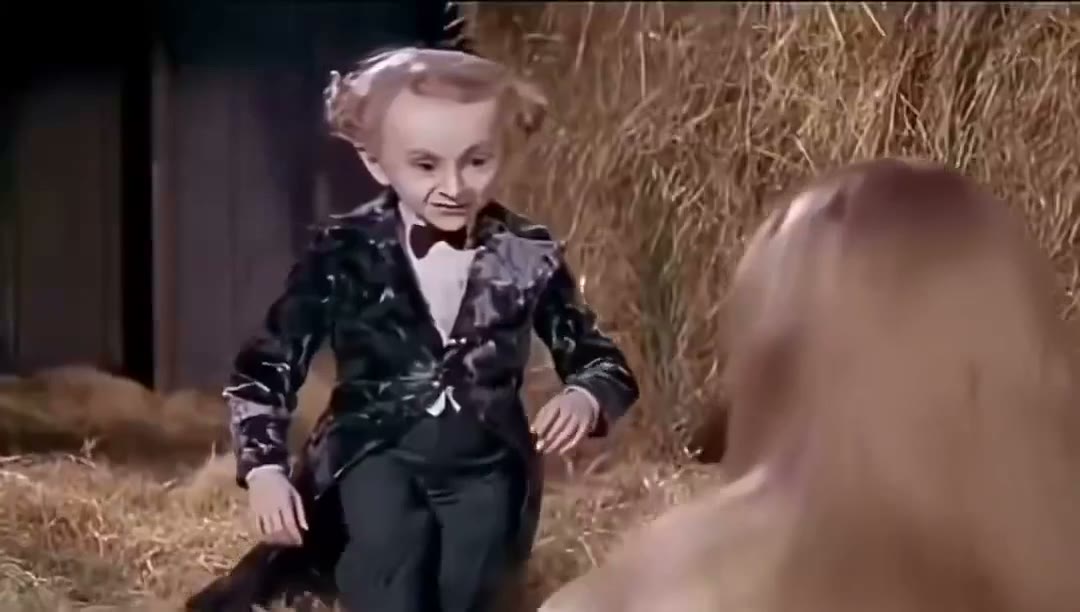
You can make a personal Rumpelstiltskin Dance video from one clear photo. The prepared reference guides the shushing gesture, tiptoe shuffle and fairy-tale scene; your photo supplies the dancing lead. The workflow is upload, choose framing, pay once, follow the private order and download. You do not need to film yourself dancing or prepare a motion-reference clip.
This guide covers the actual one-photo tool on this website: 13 seconds, 768P, original AI-generated audio and a one-time $5.99 USD payment. It also explains what to check before posting. The reference player is source footage, not a generated customer result, and the model can vary the appearance and movement in your output.
What Rumpelstiltskin Dance video are you making?
The visual target is the small, theatrical dance in a vintage fairy-tale setting: a finger held near the lips, a mischievous expression and tiny tiptoe steps. You may have seen it described as the dancing gnome meme or the “Tip Toein’ in My Jordans” AI dance. Those phrases help identify the scene when a repost does not name the character. Watch the displayed reference to decide whether it is the routine you want.
Know Your Meme’s entry identifies the circulating dance as AI-generated and documents its social remixes. The vintage styling caused confusion with old film footage. This site is an independent recreation tool: it does not claim authorship of that original clip or an affiliation with its creators. Your purchase generates a new personal interpretation.
If you recognize the scene by its soundtrack, the Tiptoeing in My Jordans meme generator explains the song and documented origin, with the same photo upload tool directly on that page.
Step 1: choose a photo with a clear dancing lead
Pick an image of one person with a clearly visible face. Even lighting gives the model more useful facial information than deep shadows or blown-out highlights. Avoid sunglasses, a hand covering the face or a tiny face far from the camera. A photo that shows some clothing and body shape can also give the model more context than a very tight crop. You do not need a dancing pose.
If several people appear in your source, prepare a separate image of the intended dancer before uploading. This version takes one photo and has no second-person casting input. It does not provide a control for choosing a spectator from a group photo. Use a photograph you own or have permission to use, and choose a different image if the subject would not agree to the edit.
The accepted formats are JPG, PNG and WebP, with a 10 MB limit. If your phone saved a HEIC image, export a supported copy first. Check that the exported face is still sharp. Compressing a large file can help it fit the limit, but aggressive compression may remove the detail that makes the dancer recognizable. Open the final file before uploading rather than relying on its thumbnail.
Step 2: upload directly into the generator
Open the Rumpelstiltskin Dance AI video generator and use the visible file input or upload area. Select your photo, then check the preview. If you chose the wrong image, replace it before proceeding. The reference sits beside the tool on wider screens and remains available on a phone. You can inspect the target routine without creating an order or paying for a generation.
Uploading is preparation, not a free rendered preview. The actual generation follows payment. If the tool rejects your image, read the message and fix the format or size rather than clicking the payment button repeatedly. A recognizable source face matters more than a clever caption at this stage. The caption is something you can add to the finished video later in your editor or social app.
Step 3: choose adaptive, portrait or landscape
Select portrait 9:16 when a vertical composition fits your intended TikTok, Reel or Short. It gives the scene a phone-oriented shape, but you should still review the delivered framing. The face, shushing hand and feet are all useful to the joke. A caption placed over the lower body can hide the tiptoe sequence even when the underlying dance is clear.
Select landscape 16:9 when you prefer a wider view of the scene or plan a horizontal edit. Adaptive follows the reference framing. These are three composition choices for the same prepared routine. They do not unlock a new dance, additional characters or a longer film. All options use the configured 13-second duration and 768P resolution. Choose your frame before payment, because it is saved with the order.
Step 4: review the price and keep access to your order
A generation costs $5.99 USD once, with no subscription or recurring renewal. You can add a delivery email to receive payment and completion links, or continue without one. An account is optional. Review your image and frame before continuing to the payment page, and make sure you understand that the delivered result is AI-generated and may differ from the source choreography or your photo.
Without email, the order is saved in My orders on the same device and browser. Save your private link as well. Clearing browser data or switching browsers can remove the locally saved access. A private order link gives access to that order, so do not use it as your public social caption. The order page displays processing progress; this tool does not promise a fixed generation time.
Step 5: inspect the result and download within 14 days
When processing completes, watch the whole clip before editing it. Start with the face: does the lead remain recognizable across cuts? Then check the hand near the lips and the continuity of the feet. Look for changes in anatomy or clothing that distract from the performance. The reference guides the output, but AI does not guarantee exact facial likeness, identical steps or frame-for-frame timing.
Download and save a copy within 14 days after delivery. The order page shows the availability window. Keep the local file if you plan to make several caption versions later. If generation is confirmed to have failed, the order flow queues a full refund and shows the refund status. Review that page for the actual outcome rather than starting a duplicate payment while the first order is still processing.
How to use the “Tip Toein’ in My Jordans” sound
The familiar meme sound is associated with RiFF RAFF’s “Tip Toe Wing In My Jawwdinz.” Your generated video includes original AI-generated audio instead of that commercial recording. The soundtrack and the dance are separate parts of a remix. A circulating repost can use a different audio edit, so listen to the version you are trying to reference rather than assuming every tiptoe clip has the same sound.
After downloading, check the destination platform’s music tools for the recording and its permitted use. Availability can differ by location and account. Listen to your final edit with sound enabled and check whether the clip’s existing audio competes with the added track. Buying a generated video here does not grant rights to a separate recording. YouTube’s official Shorts guide explains its creation and sound workflow.
Add a reaction caption that fits the movement
The shush works with a secret; the tiny steps work with sneaking; the pleased expression works with a small victory. Choose one concrete setup that a viewer can understand immediately. Original ideas include “Me after finding the missing charger” or “Sneaking out before another meeting starts.” These are writing suggestions, not generated examples or claims about how many views a caption will earn.
Keep the text clear of the face, hands and feet. Let a viewer see why that particular movement suits the joke. In the post description, you can name the Rumpelstiltskin Dance or AI tiptoe meme. Documented social examples use #tiptoeinginmyjordans, #tiptoeing and #ai. Choose tags that describe your edit and audience, instead of filling the description with unrelated trend names. Posting is something you do yourself after download.
The fairy-tale name and the modern meme
Rumpelstiltskin is also a Grimm character, so a search for the name alone can lead to story adaptations. The University of Pittsburgh’s translation provides the tale’s background and its straw-to-gold setting. The modern tiptoe clip is a separate AI video meme. When sharing your version, describing it as an AI dance helps viewers understand what they are watching.
Before publishing, check the downloaded file, the caption placement, the final sound and the intended audience. Keep your source photo and private order details out of the post unless you mean to show them. Public video sharing is an optional action after delivery. The tool supplies the short dance clip; your caption, editing choices and platform upload turn it into your own social remix.